 |
|
|
|
|
|
|
|
|
|
|
|
|
|
|
|
|
|
|
|
|
|
|
|
|
|
|
|
|
|
|
|
|
|
|
|
|
|
|
|
|
|
|
|
|
|
 |
|
|
|
 |
|
|
|
|
 |
|
|
|
 |
 |
|
|
|
|
|
Exploring The Boxer Model
|
|
|
|
|
|
 |
|
|
|
 |
|
|
|
|
|
|
|
|
|
 |
|
 |
|
|
|
|
|
|
|
|
|
|
|
Using Boxer students can write programs that create dynamic, graphical models representing their observations of phenomena.
|
|
|
|
|
|
|
|
 |
|
|
|
|
|
|
|
|
|
|
|
|
|
|
|
|
|
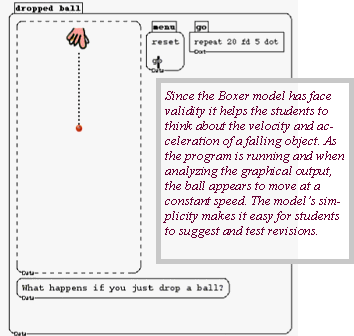
The Boxer screen-shot below contains a one line program, go, a menu and a graphics box containing the output of the program. This simulation is a model of a ball being dropped to the ground. Importantly, the model possesses face validity. That is, both during and after the program's execution it resembles a ball falling to the ground. We think that this is an important quality because face validity makes the representation more concrete. We think that concreteness helps to promote conceptual understanding by allowing students to build from their own observations towards standard representations, such as a graph in the cartesian plane. For this reason we believe that explorations using Boxer provide a useful introduction to model building in the study of motion..
|
|
|
|
|
|
|
|
 |
|
|
 |
|
|
|
|
|
|
|
|
 |
|
|
|
|
|
|
|
|
|
|
|
|
|
|
|
|
|
 |
|
|
|
|
|
|
|
|
|
|
|
|
|
|
|
In practice, students quickly appreciate that go provides a poor model for their observations. The students interpret both the movement of the ball and the pattern of dots in terms of the speed of the ball and they are quick to observe that the ball fails to accelerate.
To capitalize on the students' observations, we advocate a series of classroom activities that explore the qualities of the model in conjunction with observations of the motion of falling objects. Below we list a thumbnail sequence of activities for middle school students. More detailed instructions, worksheets and other resources are available at the Classroom Resources link.
In order to help students make their intuitive ideas about the motion of a falling object explicit, begin with observations and discussion of a ball being dropped to the ground. Demonstrate the go program to the class several times and ask: how is the movement of the ball in go similar to or different from the movement of a ball in the real world?
Exploration of the go model on the computer should begin with play with the go model answering the question: how does the program in box go work? Students may be more successful working in pairs.
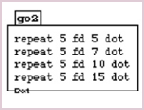
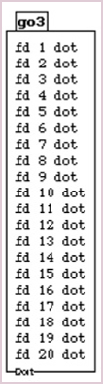
Once the students understand the commands in the go program, then offer them the following prompt: can you write a program that provides a better demonstration of how a ball falls in the real world? Encourage the students to keep track of their ideas by writing new programs rather than rewriting old programs (e.g., go2 and go3 at left).
Student exploration may take several periods. Incorporate regular sharing sessions where the students demonstrate programs and share observations.
|
|
|
|
|
|
|
|
|
|
|
|
|
|
|
|
|
|
|
|
|
|
 |
|
|
|
|
|
|
|
|
|
|
|
|
|
|
|
|
|
|
